Sunday, 22 December 2019

Start/Stop OHS Instance

Start/Stop OHS Instance

Start and stop scripts for the node manager and OHS instance are created under the domain home. The typical start and stop sequences are shown below.
# Start
nohup $DOMAIN_HOME/bin/startNodeManager.sh > /dev/null 2>&1 &
$DOMAIN_HOME/bin/startComponent.sh ohs1

#Stop
$DOMAIN_HOME/bin/stopComponent.sh ohs1
$DOMAIN_HOME/bin/stopNodeManager.sh
It should now be possible to start and stop the OHS instance with the scripts created earlier in the setup section.
~/scripts/start_all.sh
~/scripts/stop_all.sh

Important Files

There are a number of important config files, but the ones you are most likely to visit are the following.
$INSTANCE_HOME/httpd.conf
$INSTANCE_HOME/ssl.conf
$INSTANCE_HOME/mod_wl_ohs.conf
You can diagnose issues by checking the log files under the "$DOMAIN_HOME/servers/ohs1/logs/" directory.
$DOMAIN_HOME/servers/ohs1/logs/admin_log
$DOMAIN_HOME/servers/ohs1/logs/access_log
$DOMAIN_HOME/servers/ohs1/logs/ohs1.log

Wednesday, 18 December 2019

route config for solaris11

Configuring Persistent Routes

Because the /etc/defaultrouter file is deprecated in Oracle Solaris 11, you can no longer manage routes (default or otherwise) by using this file. Using the route command is the only way that you can manually add a route to a system. To make the changes persist across reboots, use the –p option with the route command.
# route -p add default ip-address
For example, you would add a route to network 203.0.113.0, which has its gateway as the border router, as follows:
# route -p add -net 203.0.113.0/24 -gateway 203.0.113.150
add net 203.0.113.0: gateway 203.0.113.150
View routes that were created by the using the previous command as follows:
# route -p show
Also, note that after an installation, you can no longer determine a system's default route by checking the /etc/defaultrouter file. To display the currently active routes on a system, use the netstat command with the following options:
# netstat -rn

Sunday, 1 December 2019

partition find for linux

Find partition for lunix
================
 lsblk -io KNAME, TYPE, SIZE, MODEl
 fdisk -l
  975  df -kh
  976  fdisk -l
  977  lsblk -io KNAME, TYPE, SIZE, MODEl
  978  lsblk -io NAME, TYPE, SIZE, MODEl
  979  lsblk -io  TYPE, SIZE, MODEl
  980  lsblk -io
  981  lsblk -all
  982  lsblk -io NAME, SIZE, TYPE,
  983  lsblk -io NAME SIZE TYPE MOUNTPOINT
  984  lsblk -al NAME SIZE TYPE MOUNTPOINT
  985  lsblk -all
  986  lshw -class disk
  987  lshw  disk
  988  lshw
  989  ls
  990  hwinfo --disk
============
  lsblk -o name,mountpoint

 output result:
lsblk -o name,mountpoint
NAME                 MOUNTPOINT
sda
├─sda1               /boot
├─sda2               /tmp
├─sda3               /usr
├─sda4
├─sda5               [SWAP]
├─sda6               /var
└─sda7               /
sdb
├─sdb1
└─mpathh (dm-3)
  └─mpathhp1 (dm-6)  /u01
sdc
├─sdc1
└─mpathg (dm-1)
  └─mpathgp1 (dm-4)  /u03
sdd
├─sdd1
└─mpathh (dm-3)
  └─mpathhp1 (dm-6)  /u01
sde
├─sde1
└─mpathg (dm-1)
  └─mpathgp1 (dm-4)  /u03
sdf
├─sdf1
└─mpathf (dm-0)
  └─mpathfp1 (dm-2)  /u02
sdg
├─sdg1
└─mpathi (dm-5)
  └─mpathip1 (dm-7)  /u04
sdh
├─sdh1
└─mpathf (dm-0)
  └─mpathfp1 (dm-2)  /u02
sdi
├─sdi1
└─mpathi (dm-5)
  └─mpathip1 (dm-7)  /u04
sdj
├─sdj1
└─mpathh (dm-3)
  └─mpathhp1 (dm-6)  /u01
sdk
├─sdk1
└─mpathg (dm-1)
  └─mpathgp1 (dm-4)  /u03
sdl
├─sdl1
└─mpathh (dm-3)
  └─mpathhp1 (dm-6)  /u01
sdm
├─sdm1
└─mpathg (dm-1)
  └─mpathgp1 (dm-4)  /u03
sdn
├─sdn1
└─mpathf (dm-0)
  └─mpathfp1 (dm-2)  /u02
sdo
├─sdo1
└─mpathi (dm-5)
  └─mpathip1 (dm-7)  /u04
sdp
├─sdp1
└─mpathf (dm-0)
  └─mpathfp1 (dm-2)  /u02
sdq
├─sdq1
└─mpathi (dm-5)
  └─mpathip1 (dm-7)  /u04
sdr
├─sdr1
└─mpathh (dm-3)
  └─mpathhp1 (dm-6)  /u01
sds
├─sds1
└─mpathg (dm-1)
  └─mpathgp1 (dm-4)  /u03
sdt
├─sdt1
└─mpathh (dm-3)
  └─mpathhp1 (dm-6)  /u01
sdu
├─sdu1
└─mpathg (dm-1)
  └─mpathgp1 (dm-4)  /u03
sdv
├─sdv1
└─mpathf (dm-0)
  └─mpathfp1 (dm-2)  /u02
sdw
├─sdw1
└─mpathi (dm-5)
  └─mpathip1 (dm-7)  /u04
sdx
├─sdx1
└─mpathf (dm-0)
  └─mpathfp1 (dm-2)  /u02
sdy
├─sdy1
└─mpathi (dm-5)
  └─mpathip1 (dm-7)  /u04
sdz
├─sdz1
└─mpathh (dm-3)
  └─mpathhp1 (dm-6)  /u01
sr0
sdaa
├─sdaa1
└─mpathg (dm-1)
  └─mpathgp1 (dm-4)  /u03
sdab
├─sdab1
└─mpathh (dm-3)
  └─mpathhp1 (dm-6)  /u01
sdac
├─sdac1
└─mpathg (dm-1)
  └─mpathgp1 (dm-4)  /u03
sdad
├─sdad1
└─mpathf (dm-0)
  └─mpathfp1 (dm-2)  /u02
sdae
├─sdae1
└─mpathi (dm-5)
  └─mpathip1 (dm-7)  /u04
sdaf
├─sdaf1
└─mpathf (dm-0)
  └─mpathfp1 (dm-2)  /u02
sdag
├─sdag1
└─mpathi (dm-5)
  └─mpathip1 (dm-7)  /u04
sdah
├─sdah1
└─mpathj (dm-8)
  └─mpathjp1 (dm-10) /u05
sdai
├─sdai1
└─mpathj (dm-8)
  └─mpathjp1 (dm-10) /u05
sdaj
├─sdaj1
└─mpathk (dm-9)
  └─mpathkp1 (dm-11) /u06
sdak
├─sdak1
└─mpathk (dm-9)
  └─mpathkp1 (dm-11) /u06
sdal
├─sdal1
└─mpathj (dm-8)
  └─mpathjp1 (dm-10) /u05
sdam
├─sdam1
└─mpathj (dm-8)
  └─mpathjp1 (dm-10) /u05
sdbb
├─sdbb1
└─mpathl (dm-12)
  └─mpathlp1 (dm-14) /u07
sdan
├─sdan1
└─mpathk (dm-9)
  └─mpathkp1 (dm-11) /u06
sdbc
├─sdbc1
└─mpathl (dm-12)
  └─mpathlp1 (dm-14) /u07
sdao
├─sdao1
└─mpathk (dm-9)
  └─mpathkp1 (dm-11) /u06
sdap
├─sdap1
└─mpathj (dm-8)
  └─mpathjp1 (dm-10) /u05
sdbf
├─sdbf1
└─mpathl (dm-12)
  └─mpathlp1 (dm-14) /u07
sdaq
├─sdaq1
└─mpathj (dm-8)
  └─mpathjp1 (dm-10) /u05
sdbg
├─sdbg1
└─mpathl (dm-12)
  └─mpathlp1 (dm-14) /u07
sdar
├─sdar1
└─mpathk (dm-9)
  └─mpathkp1 (dm-11) /u06
sdas
├─sdas1
└─mpathk (dm-9)
  └─mpathkp1 (dm-11) /u06
sdat
├─sdat1
└─mpathj (dm-8)
  └─mpathjp1 (dm-10) /u05
sdbj
├─sdbj1
└─mpathl (dm-12)
  └─mpathlp1 (dm-14) /u07
sdau
├─sdau1
└─mpathj (dm-8)
  └─mpathjp1 (dm-10) /u05
sdbk
├─sdbk1
└─mpathl (dm-12)
  └─mpathlp1 (dm-14) /u07
sdav
├─sdav1
└─mpathk (dm-9)
  └─mpathkp1 (dm-11) /u06
sdca
├─sdca1
└─mpatho (dm-18)
  └─mpathop1 (dm-19)
sdaw
├─sdaw1
└─mpathk (dm-9)
  └─mpathkp1 (dm-11) /u06
sdcb
├─sdcb1
└─mpatho (dm-18)
  └─mpathop1 (dm-19)
sdax
├─sdax1
└─mpathl (dm-12)
  └─mpathlp1 (dm-14) /u07
sdbn
├─sdbn1
└─mpathn (dm-16)
  └─mpathnp1 (dm-17) /u09
sdcc
├─sdcc1
└─mpatho (dm-18)
  └─mpathop1 (dm-19)
sday
├─sday1
└─mpathl (dm-12)
  └─mpathlp1 (dm-14) /u07
sdbo
├─sdbo1
└─mpathn (dm-16)
  └─mpathnp1 (dm-17) /u09
sdcd
└─mpathp (dm-20)
  └─mpathpp1 (dm-21) /archivelog
sdce
└─mpathp (dm-20)
  └─mpathpp1 (dm-21) /archivelog
sdbp
├─sdbp1
└─mpathn (dm-16)
  └─mpathnp1 (dm-17) /u09
sdcf
└─mpathp (dm-20)
  └─mpathpp1 (dm-21) /archivelog
sdbq
├─sdbq1
└─mpathn (dm-16)
  └─mpathnp1 (dm-17) /u09
sdcg
└─mpathp (dm-20)
  └─mpathpp1 (dm-21) /archivelog
sdbr
├─sdbr1
└─mpathn (dm-16)
  └─mpathnp1 (dm-17) /u09
sdch
└─mpathp (dm-20)
  └─mpathpp1 (dm-21) /archivelog
sdbs
├─sdbs1
└─mpathn (dm-16)
  └─mpathnp1 (dm-17) /u09
sdci
└─mpathp (dm-20)
  └─mpathpp1 (dm-21) /archivelog
sdbt
├─sdbt1
└─mpathn (dm-16)
  └─mpathnp1 (dm-17) /u09
sdcj
└─mpathp (dm-20)
  └─mpathpp1 (dm-21) /archivelog
sdbu
├─sdbu1
└─mpathn (dm-16)
  └─mpathnp1 (dm-17) /u09
sdck
└─mpathp (dm-20)
  └─mpathpp1 (dm-21) /archivelog
sdbv
├─sdbv1
└─mpatho (dm-18)
  └─mpathop1 (dm-19)
sdbw
├─sdbw1
└─mpatho (dm-18)
  └─mpathop1 (dm-19)
sdbx
├─sdbx1
└─mpatho (dm-18)
  └─mpathop1 (dm-19)
sdby
├─sdby1
└─mpatho (dm-18)
  └─mpathop1 (dm-19)
sdbz
├─sdbz1
└─mpatho (dm-18)
  └─mpathop1 (dm-19)
mpathm (dm-13)
===================
 lsblk -o name,size,mountpoint
NAME                   SIZE MOUNTPOINT
sda                    1.1T
├─sda1                 500M /boot
├─sda2                 200G /tmp
├─sda3                 200G /usr
├─sda4                   1K
├─sda5                 128G [SWAP]
├─sda6                 100G /var
└─sda7               488.8G /
sdb                    500G
├─sdb1                 500G
└─mpathh (dm-3)        500G
  └─mpathhp1 (dm-6)    500G /u01
sdc                    500G
├─sdc1                 500G
└─mpathg (dm-1)        500G
  └─mpathgp1 (dm-4)    500G /u03
sdd                    500G
├─sdd1                 500G
└─mpathh (dm-3)        500G
  └─mpathhp1 (dm-6)    500G /u01
sde                    500G
├─sde1                 500G
└─mpathg (dm-1)        500G
  └─mpathgp1 (dm-4)    500G /u03
sdf                      1T
├─sdf1                1024G
└─mpathf (dm-0)          1T
  └─mpathfp1 (dm-2)   1024G /u02
sdg                    600G
├─sdg1                 600G
└─mpathi (dm-5)        600G
  └─mpathip1 (dm-7)    600G /u04
sdh                      1T
├─sdh1                1024G
└─mpathf (dm-0)          1T
  └─mpathfp1 (dm-2)   1024G /u02
sdi                    600G
├─sdi1                 600G
└─mpathi (dm-5)        600G
  └─mpathip1 (dm-7)    600G /u04
sdj                    500G
├─sdj1                 500G
└─mpathh (dm-3)        500G
  └─mpathhp1 (dm-6)    500G /u01
sdk                    500G
├─sdk1                 500G
└─mpathg (dm-1)        500G
  └─mpathgp1 (dm-4)    500G /u03
sdl                    500G
├─sdl1                 500G
└─mpathh (dm-3)        500G
  └─mpathhp1 (dm-6)    500G /u01
sdm                    500G
├─sdm1                 500G
└─mpathg (dm-1)        500G
  └─mpathgp1 (dm-4)    500G /u03
sdn                      1T
├─sdn1                1024G
└─mpathf (dm-0)          1T
  └─mpathfp1 (dm-2)   1024G /u02
sdo                    600G
├─sdo1                 600G
└─mpathi (dm-5)        600G
  └─mpathip1 (dm-7)    600G /u04
sdp                      1T
├─sdp1                1024G
└─mpathf (dm-0)          1T
  └─mpathfp1 (dm-2)   1024G /u02
sdq                    600G
├─sdq1                 600G
└─mpathi (dm-5)        600G
  └─mpathip1 (dm-7)    600G /u04
sdr                    500G
├─sdr1                 500G
└─mpathh (dm-3)        500G
  └─mpathhp1 (dm-6)    500G /u01
sds                    500G
├─sds1                 500G
└─mpathg (dm-1)        500G
  └─mpathgp1 (dm-4)    500G /u03
sdt                    500G
├─sdt1                 500G
└─mpathh (dm-3)        500G
  └─mpathhp1 (dm-6)    500G /u01
sdu                    500G
├─sdu1                 500G
└─mpathg (dm-1)        500G
  └─mpathgp1 (dm-4)    500G /u03
sdv                      1T
├─sdv1                1024G
└─mpathf (dm-0)          1T
  └─mpathfp1 (dm-2)   1024G /u02
sdw                    600G
├─sdw1                 600G
└─mpathi (dm-5)        600G
  └─mpathip1 (dm-7)    600G /u04
sdx                      1T
├─sdx1                1024G
└─mpathf (dm-0)          1T
  └─mpathfp1 (dm-2)   1024G /u02
sdy                    600G
├─sdy1                 600G
└─mpathi (dm-5)        600G
  └─mpathip1 (dm-7)    600G /u04
sdz                    500G
├─sdz1                 500G
└─mpathh (dm-3)        500G
  └─mpathhp1 (dm-6)    500G /u01
sr0                   1024M
sdaa                   500G
├─sdaa1                500G
└─mpathg (dm-1)        500G
  └─mpathgp1 (dm-4)    500G /u03
sdab                   500G
├─sdab1                500G
└─mpathh (dm-3)        500G
  └─mpathhp1 (dm-6)    500G /u01
sdac                   500G
├─sdac1                500G
└─mpathg (dm-1)        500G
  └─mpathgp1 (dm-4)    500G /u03
sdad                     1T
├─sdad1               1024G
└─mpathf (dm-0)          1T
  └─mpathfp1 (dm-2)   1024G /u02
sdae                   600G
├─sdae1                600G
└─mpathi (dm-5)        600G
  └─mpathip1 (dm-7)    600G /u04
sdaf                     1T
├─sdaf1               1024G
└─mpathf (dm-0)          1T
  └─mpathfp1 (dm-2)   1024G /u02
sdag                   600G
├─sdag1                600G
└─mpathi (dm-5)        600G
  └─mpathip1 (dm-7)    600G /u04
sdah                     1T
├─sdah1               1024G
└─mpathj (dm-8)          1T
  └─mpathjp1 (dm-10)  1024G /u05
sdai                     1T
├─sdai1               1024G
└─mpathj (dm-8)          1T
  └─mpathjp1 (dm-10)  1024G /u05
sdaj                   500G
├─sdaj1                500G
└─mpathk (dm-9)        500G
  └─mpathkp1 (dm-11)   500G /u06
sdak                   500G
├─sdak1                500G
└─mpathk (dm-9)        500G
  └─mpathkp1 (dm-11)   500G /u06
sdal                     1T
├─sdal1               1024G
└─mpathj (dm-8)          1T
  └─mpathjp1 (dm-10)  1024G /u05
sdam                     1T
├─sdam1               1024G
└─mpathj (dm-8)          1T
  └─mpathjp1 (dm-10)  1024G /u05
sdbb                   500G
├─sdbb1                500G
└─mpathl (dm-12)       500G
  └─mpathlp1 (dm-14)   500G /u07
sdan                   500G
├─sdan1                500G
└─mpathk (dm-9)        500G
  └─mpathkp1 (dm-11)   500G /u06
sdbc                   500G
├─sdbc1                500G
└─mpathl (dm-12)       500G
  └─mpathlp1 (dm-14)   500G /u07
sdao                   500G
├─sdao1                500G
└─mpathk (dm-9)        500G
  └─mpathkp1 (dm-11)   500G /u06
sdap                     1T
├─sdap1               1024G
└─mpathj (dm-8)          1T
  └─mpathjp1 (dm-10)  1024G /u05
sdbf                   500G
├─sdbf1                500G
└─mpathl (dm-12)       500G
  └─mpathlp1 (dm-14)   500G /u07
sdaq                     1T
├─sdaq1               1024G
└─mpathj (dm-8)          1T
  └─mpathjp1 (dm-10)  1024G /u05
sdbg                   500G
├─sdbg1                500G
└─mpathl (dm-12)       500G
  └─mpathlp1 (dm-14)   500G /u07
sdar                   500G
├─sdar1                500G
└─mpathk (dm-9)        500G
  └─mpathkp1 (dm-11)   500G /u06
sdas                   500G
├─sdas1                500G
└─mpathk (dm-9)        500G
  └─mpathkp1 (dm-11)   500G /u06
sdat                     1T
├─sdat1               1024G
└─mpathj (dm-8)          1T
  └─mpathjp1 (dm-10)  1024G /u05
sdbj                   500G
├─sdbj1                500G
└─mpathl (dm-12)       500G
  └─mpathlp1 (dm-14)   500G /u07
sdau                     1T
├─sdau1               1024G
└─mpathj (dm-8)          1T
  └─mpathjp1 (dm-10)  1024G /u05
sdbk                   500G
├─sdbk1                500G
└─mpathl (dm-12)       500G
  └─mpathlp1 (dm-14)   500G /u07
sdav                   500G
├─sdav1                500G
└─mpathk (dm-9)        500G
  └─mpathkp1 (dm-11)   500G /u06
sdca                     2T
├─sdca1                  2T
└─mpatho (dm-18)         2T
  └─mpathop1 (dm-19)     2T
sdaw                   500G
├─sdaw1                500G
└─mpathk (dm-9)        500G
  └─mpathkp1 (dm-11)   500G /u06
sdcb                     2T
├─sdcb1                  2T
└─mpatho (dm-18)         2T
  └─mpathop1 (dm-19)     2T
sdax                   500G
├─sdax1                500G
└─mpathl (dm-12)       500G
  └─mpathlp1 (dm-14)   500G /u07
sdbn                   500G
├─sdbn1                500G
└─mpathn (dm-16)       500G
  └─mpathnp1 (dm-17)   500G /u09
sdcc                     2T
├─sdcc1                  2T
└─mpatho (dm-18)         2T
  └─mpathop1 (dm-19)     2T
sday                   500G
├─sday1                500G
└─mpathl (dm-12)       500G
  └─mpathlp1 (dm-14)   500G /u07
sdbo                   500G
├─sdbo1                500G
└─mpathn (dm-16)       500G
  └─mpathnp1 (dm-17)   500G /u09
sdcd                     1T
└─mpathp (dm-20)         1T
  └─mpathpp1 (dm-21)  1024G /archivelog
sdce                     1T
└─mpathp (dm-20)         1T
  └─mpathpp1 (dm-21)  1024G /archivelog
sdbp                   500G
├─sdbp1                500G
└─mpathn (dm-16)       500G
  └─mpathnp1 (dm-17)   500G /u09
sdcf                     1T
└─mpathp (dm-20)         1T
  └─mpathpp1 (dm-21)  1024G /archivelog
sdbq                   500G
├─sdbq1                500G
└─mpathn (dm-16)       500G
  └─mpathnp1 (dm-17)   500G /u09
sdcg                     1T
└─mpathp (dm-20)         1T
  └─mpathpp1 (dm-21)  1024G /archivelog
sdbr                   500G
├─sdbr1                500G
└─mpathn (dm-16)       500G
  └─mpathnp1 (dm-17)   500G /u09
sdch                     1T
└─mpathp (dm-20)         1T
  └─mpathpp1 (dm-21)  1024G /archivelog
sdbs                   500G
├─sdbs1                500G
└─mpathn (dm-16)       500G
  └─mpathnp1 (dm-17)   500G /u09
sdci                     1T
└─mpathp (dm-20)         1T
  └─mpathpp1 (dm-21)  1024G /archivelog
sdbt                   500G
├─sdbt1                500G
└─mpathn (dm-16)       500G
  └─mpathnp1 (dm-17)   500G /u09
sdcj                     1T
└─mpathp (dm-20)         1T
  └─mpathpp1 (dm-21)  1024G /archivelog
sdbu                   500G
├─sdbu1                500G
└─mpathn (dm-16)       500G
  └─mpathnp1 (dm-17)   500G /u09
sdck                     1T
└─mpathp (dm-20)         1T
  └─mpathpp1 (dm-21)  1024G /archivelog
sdbv                     2T
├─sdbv1                  2T
└─mpatho (dm-18)         2T
  └─mpathop1 (dm-19)     2T
sdbw                     2T
├─sdbw1                  2T
└─mpatho (dm-18)         2T
  └─mpathop1 (dm-19)     2T
sdbx                     2T
├─sdbx1                  2T
└─mpatho (dm-18)         2T
  └─mpathop1 (dm-19)     2T
sdby                     2T
├─sdby1                  2T
└─mpatho (dm-18)         2T
  └─mpathop1 (dm-19)     2T
sdbz                     2T
├─sdbz1                  2T
└─mpatho (dm-18)         2T
  └─mpathop1 (dm-19)     2T
mpathm (dm-13)           1T
You have mail in /var/spool/mail/root
=============================


Tuesday, 26 November 2019

SAN Switch update

firmwaredownload example:

switch:admin> firmwaredownload
Server Name or IP Address: IP.TO.SCP.SERVER
User Name: username
File Name: /path/to/v6.2.2e
Network Protocol(1-auto-select, 2-FTP, 3-SCP) [1]: 3
Password:
Server IP: IP.TO.SCP.SERVER, Protocol IPv4
Checking system settings for firmwaredownload...
System settings check passed.
You can run firmwaredownloadstatus to get the status
 of this command.
This command will cause a warm/non-disruptive boot on the switch,
 but will require that existing telnet, secure telnet or SSH sessions
 be restarted.
Do you want to continue [Y]: y
 Firmware is being downloaded to the switch. This step may take up to 30 minutes.
 Preparing for firmwaredownload...
 Start to install packages...
 dir ##################################################
 [[lots of these for all packets]] ##################################################
 [[also stuff like these are seen many times:]]
 warning: /etc/fabos/pki/switch.0.rootcrt created as /etc/fabos/pki/switch.0.rootcrt.rpmnew
 kernel-module-ipsec ##################################################
 Removing unneeded files, please wait ...
 Finished removing unneeded files.
All packages have been downloaded successfully.
 Firmware has been downloaded to the secondary partition of the switch.
 HA Rebooting ...

Thursday, 10 October 2019

Windows NFS

Install the NFS Client (Services for NFS)

The first thing we need to do is install the NFS Client which can be done by following the steps below:
Step 1: Open Programs and Features.
Windows 10: Open Programs and Features
Step 2: Click Turn Windows features on or off.
Turn Windows 10 Features On or Off
Step 3: Scroll down and check the option Services for NFS, then click OK.
Windows 10: Enable Services for NFS
Step 4: Once installed, click Close and exit back to the desktop.

Enable Write Permissions for the Anonymous User

With the default options you will only have read permissions when mounting a UNIX share using the anonymous user. We can give the anonymous user write permissions by changing the UID and GID that it uses to mount the share.
The image below shows the a share mounted using the default settings.
Windows 10: NFS Mount Command
To change the UID and GID we need to make a simple change to the Windows registry by performing the following steps:
  1. Open regedit by typing it in the search box end pressing Enter.
  2. Browse to HKEY_LOCAL_MACHINE\SOFTWARE\Microsoft\ClientForNFS\CurrentVersion\Default.
  3. Create a new New DWORD (32-bit) Value inside the Default folder named AnonymousUid and assign the UID found on the UNIX directory as shared by the NFS system.
  4. Create a new New DWORD (32-bit) Value inside the Default folder named AnonymousGid and assign the GID found on the UNIX directory as shared by the NFS system. Windows 10: Regedit NFS AnonymousUid and AnonymousGid
  5. Restart the NFS client or reboot the machine to apply the changes.
The output of the mount command should now look like this:
Local    Remote                                 Properties
-------------------------------------------------------------------------------
Z:       \\10.1.1.211\mnt\vms                   UID=0, GID=0
                                                rsize=1048576, wsize=1048576
                                                mount=soft, timeout=1.6
                                                retry=1, locking=yes
                                                fileaccess=755, lang=ANSI
                                                casesensitive=no
                                                sec=sys
Notice the 0 value applied to the UID and GID. This means the share is mounted using the root user.

How to Mount an NFS Share

Assuming your NAS device is on the same network as your Windows machine and the IP address of the device is 10.1.1.211, the following command will mount a share on the NFS system at /mnt/vms.
C:\Users\windows>mount -o anon \\10.1.1.211\mnt\vms Z:
Z: is now successfully connected to \\10.1.1.211\mnt\vms

The command completed successfully.
The share is now mounted and we can access the data by navigating to the Z: drive.
Mounted NFS Share in Windows 10
That’s it, we can now write to the NAS device. Although, I did notice that trying to open the share for the first time takes a long time.

Tuesday, 24 September 2019

install and configure FreeIPA on Red Hat Linux

server's /etc/hosts file pointing to itself:
 
# cat /etc/hosts
127.0.0.1   localhost localhost.localdomain localhost4 localhost4.localdomain4
::1         localhost localhost.localdomain localhost6 localhost6.localdomain6

192.168.122.147 rhel7.ipa.linuxconfig.org rhel7
 
 
And the hostname provided in the hosts file MUST be the FQDN of the machine.

 # hostname
rhel7.ipa.linuxconfig.org
 This is an important step, don't miss it. The same hostname needed in the network file:

 # grep HOSTNAME /etc/sysconfig/network
HOSTNAME=rhel7.ipa.linuxconfig.org 
 
yum command will do: 

 # yum install ipa-server ipa-server-dns
 On a base install, yum will provide a long list of 
dependencies, including Apache Tomcat, Apache Httpd, 389-ds (the LDAP 
server), and so on. After yum finishes, open the ports needed on the 
firewall:

 # firewall-cmd --add-service=freeipa-ldap
success
# firewall-cmd --add-service=freeipa-ldap --permanent
success 
 

Setup

# ipa-server-install

The log file for this installation can be found in /var/log/ipaserver-install.log
==============================================================================
This program will set up the IPA Server.

This includes:
  * Configure a stand-alone CA (dogtag) for certificate management
  * Configure the Network Time Daemon (ntpd)
  * Create and configure an instance of Directory Server
  * Create and configure a Kerberos Key Distribution Center (KDC)
  * Configure Apache (httpd)
  * Configure the KDC to enable PKINIT

To accept the default shown in brackets, press the Enter key.

WARNING: conflicting time&date synchronization service 'chronyd' will be disabled
in favor of ntpd

## we'll use the integrated DNS server
Do you want to configure integrated DNS (BIND)? [no]: yes

Enter the fully qualified domain name of the computer
on which you're setting up server software. Using the form
<hostname>.<domainname>
Example: master.example.com.

## pressing 'enter' means we accept the default in the bracelets
## this is the reason we set up the proper FDQN for the host
Server host name [rhel7.ipa.linuxconfig.org]:       

Warning: skipping DNS resolution of host rhel7.ipa.linuxconfig.org
The domain name has been determined based on the host name.

## now we don't have to type/paste domain name
## and the installer don’t need to try setting the host’s name
Please confirm the domain name [ipa.linuxconfig.org]:      
           
The kerberos protocol requires a Realm name to be defined.
This is typically the domain name converted to uppercase.

## the Kerberos realm is mapped from the domain name
Please provide a realm name [IPA.LINUXCONFIG.ORG]:      
Certain directory server operations require an administrative user.
This user is referred to as the Directory Manager and has full access
to the Directory for system management tasks and will be added to the
instance of directory server created for IPA.
The password must be at least 8 characters long.

## Directory Manager user is for the low-level operations, like creating replicas
Directory Manager password: 
## use a very strong password in a production environment!      
Password (confirm):          

The IPA server requires an administrative user, named 'admin'.
This user is a regular system account used for IPA server administration.

## admin is the "root" of the FreeIPA system – but not the LDAP directory
IPA admin password:          
Password (confirm): 

Checking DNS domain ipa.linuxconfig.org., please wait ...
## we could setup forwarders, but this can be set later as well
Do you want to configure DNS forwarders? [yes]: no     
No DNS forwarders configured
Do you want to search for missing reverse zones? [yes]: no

The IPA Master Server will be configured with:
Hostname:       rhel7.ipa.linuxconfig.org
IP address(es): 192.168.122.147
Domain name:    ipa.linuxconfig.org
Realm name:     IPA.LINUXCONFIG.ORG

BIND DNS server will be configured to serve IPA domain with:
Forwarders:       No forwarders
Forward policy:   only
Reverse zone(s):  No reverse zone

Continue to configure the system with these values? [no]: yes

## at this point the installer will work on its own,
## and complete the process in a few minutes. The perfect time for coffee.
The following operations may take some minutes to complete.    
Please wait until the prompt is returned.      

Configuring NTP daemon (ntpd)
  [1/4]: stopping ntpd ...
The output of the installer is rather long, you can see as all components configured, restarted, and verified. At the end of the output, there some steps needed for full functionality, but not for the installation process itself.
... The ipa-client-install command was successful

==============================================================================
Setup complete

Next steps:
 1. You must make sure these network ports are open:
  TCP Ports:
    * 80, 443: HTTP/HTTPS
    * 389, 636: LDAP/LDAPS
    * 88, 464: kerberos
    * 53: bind
  UDP Ports:
    * 88, 464: kerberos
    * 53: bind
    * 123: ntp

 2. You can now obtain a kerberos ticket using the command: 'kinit admin'
    This ticket will allow you to use the IPA tools (e.g., ipa user-add)
    and the web user interface.

Be sure to back up the CA certificates stored in /root/cacert.p12
These files are required to create replicas. The password for these
files is the Directory Manager password
As the installer points out, be sure to backup the CA cert, and open additional needed ports on the firewall.

Now let's enable home directory creation on login:
# authconfig --enablemkhomedir –-update 
 

Verification

We can start testing if we have a working service stack. Let's test if we can get a Kerberos ticket for the admin user (with the password given to the admin user during install): # kinit admin Password for admin@IPA.LINUXCONFIG.ORG : # klist Ticket cache: KEYRING:persistent:0:0 Default principal: admin@IPA.LINUXCONFIG.ORG Valid starting Expires Service principal 2018-06-24 21.44.30 2018-06-25 21.44.28 krbtgt/IPA.LINUXCONFIG.ORG@IPA.LINUXCONFIG.ORG The host machine is enrolled into our new domain, and the default rules grant ssh access to the above-created admin user to all enrolled host. Let's test if these rules work as expected by opening ssh connection to localhost: # ssh admin@localhost Password: Creating home directory for admin. Last login: Sun Jun 24 21:41:57 2018 from localhost $ pwd /home/admin $ exit Let's check the status of the whole software stack:

# ipactl status Directory Service: RUNNING krb5kdc Service: RUNNING kadmin Service: RUNNING named Service: RUNNING httpd Service: RUNNING ipa-custodia Service: RUNNING ntpd Service: RUNNING pki-tomcatd Service: RUNNING ipa-otpd Service: RUNNING ipa-dnskeysyncd Service: RUNNING ipa: INFO: The ipactl command was successful And - with the Kerberos ticket acquired earlier - ask for information about the admin user using the CLI tool:

# ipa user-find admin -------------- 1 user matched -------------- User login: admin Last name: Administrator Home directory: /home/admin Login shell: /bin/bash Principal alias: admin@IPA.LINUXCONFIG.ORG UID: 630200000 GID: 630200000 Account disabled: False ---------------------------- Number of entries returned 1 ---------------------------- 

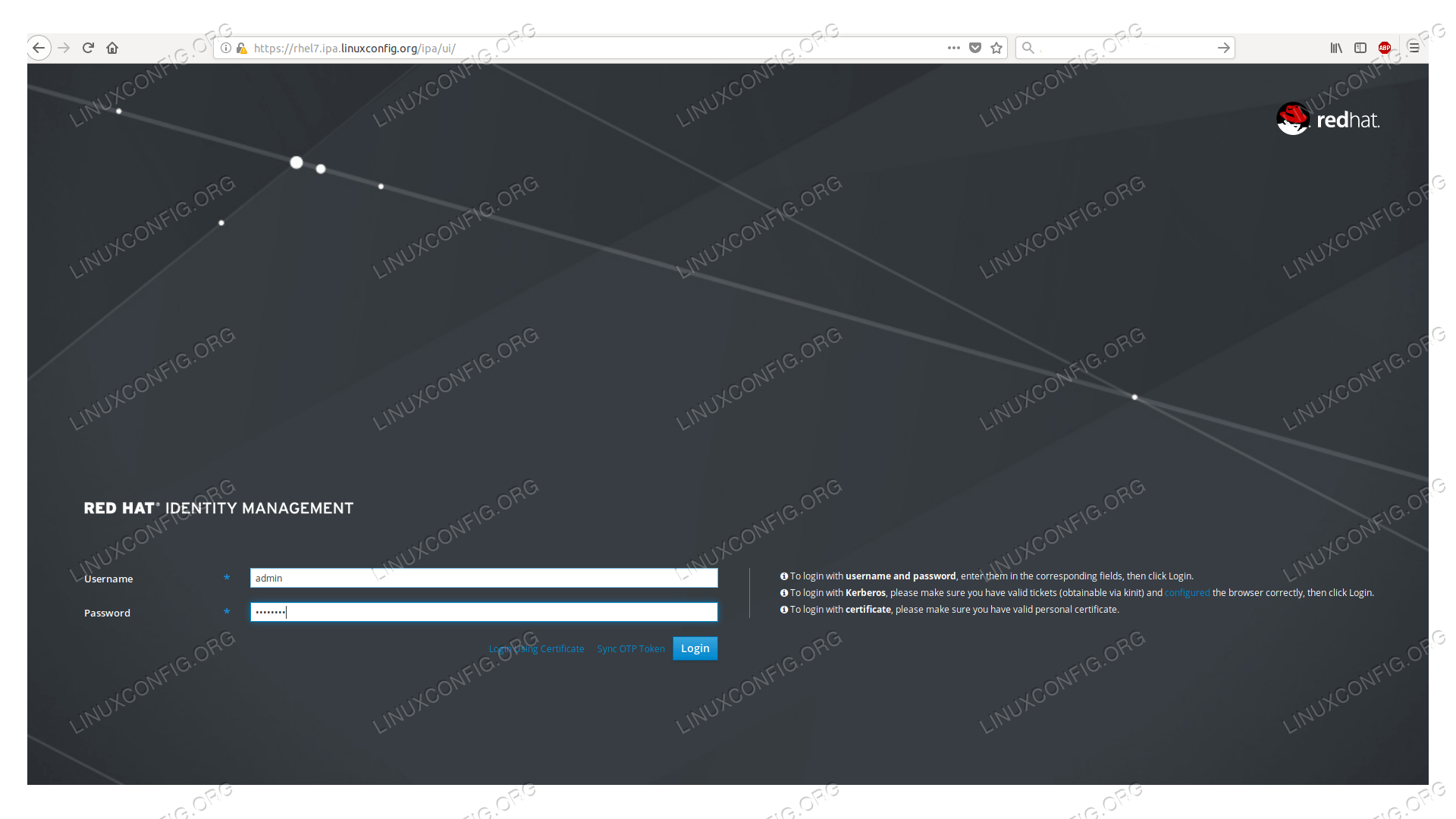
we installed a self-signed root certificate, the browser will warn us about it.

FreeIPA login page
Login page of the FreeIPA WUI
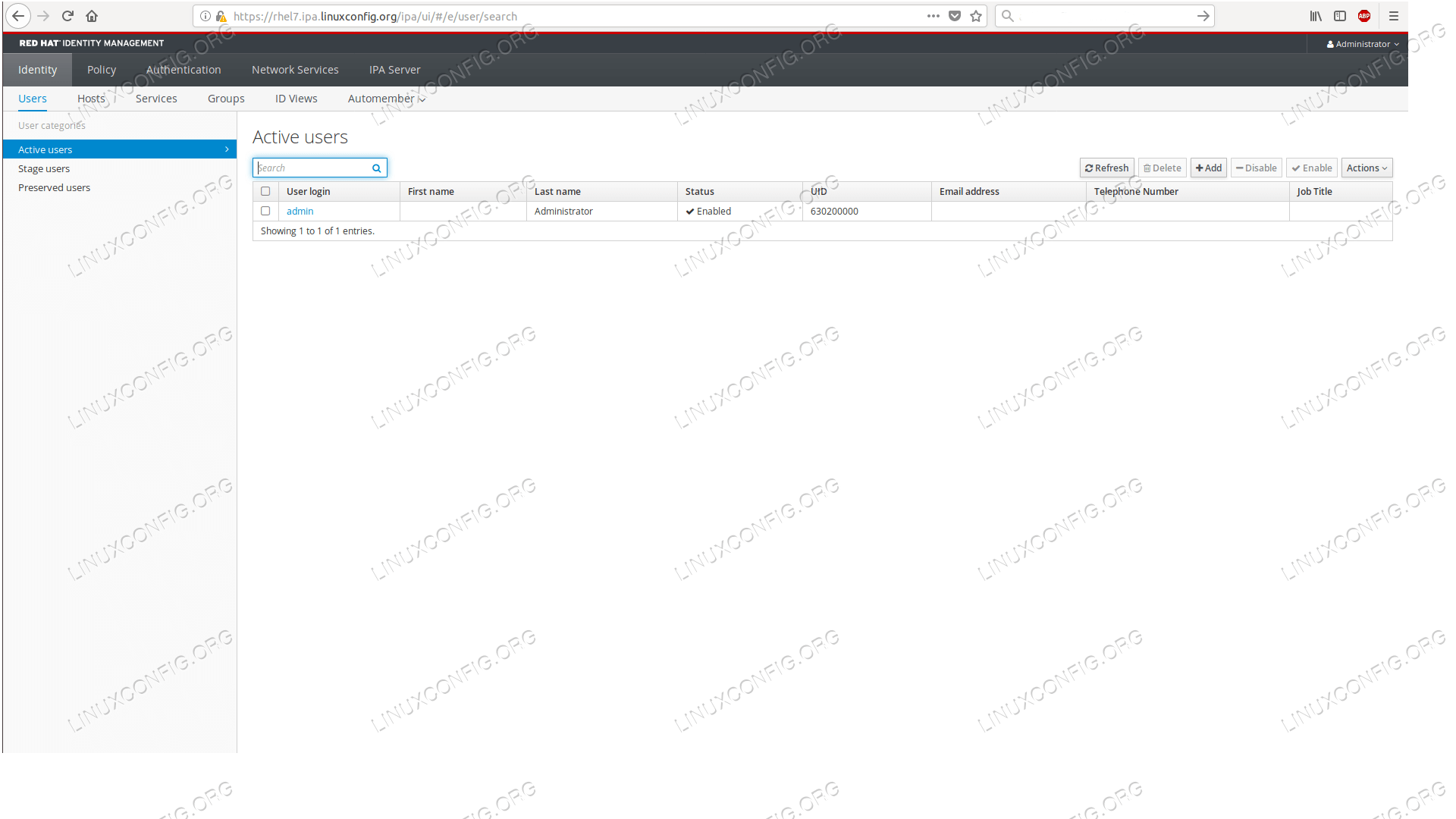
The default page after login shows the list of our users, where now only the admin user appears.

FreeIPA user list
The default page after login is the userlist in FreeIPA WUI


With this we completed our goal, we have a running FreeIPA server ready to be populated with users, hosts, certificates, and various rules.


Monday, 16 September 2019

user Disable foe Linux


1. Lock the password


# usermod -L testuser
 
# passwd -l testuser
 

2. Expire the user account


# chage -E0 testuser

3. Changing the shell

# usermod -s /sbin/nologin [username]

Verify if the account is locked or disabled.

1. Check if the user account is locked.
Check for the flag *LK* in the below command output which indicates that the account is locked.
# passwd --status root
root *LK* 2017-07-19 0 45 7 -1 (Password set, SHA512 crypt.)
2. Check if the account has an expire date.
Check for the lines Password expires and Account expires to check if the account password is expired.
# chage -l root
Last password change                                    : Jul 19, 2017
Password expires                                        : Sep 02, 2017
Password inactive                                       : never
Account expires                                         : Sep 02, 2017
Minimum number of days between password change          : 0
Maximum number of days between password change          : 45
Number of days of warning before password expires       : 7
3. Check for non-interactive shell
Check if the user shell has been changed to a non-interactive shell like /sbin/nologin.
# grep ^root /etc/passwd
root:x:0:0:root:/root:/sbin/nologin

  ++++++++++++++++++++++++++++++++++++++++

Linux check user password expiration using chage

  1. Open the terminal application
  2. Type chage -l userName command to display password expiration information for Linux user account.
  3. The -l option passed to the change show account aging information.
  4. Check tom user’s password expiry time, run: sudo chage -l tom
Let us see some examples and usage information in details.

View account again information on Linux

To see account aging information such as expiry date and time, enter:
chage -l {userNameHere}
chage -l userNameHere
To see account aging info for usernamed vivek, enter:
$ chage -l vivek
Sample outputs:
Last password change     : Jan 10, 2012
Password expires     : never
Password inactive     : never
Account expires      : never
Minimum number of days between password change  : 0
Maximum number of days between password change  : 99999
Number of days of warning before password expires : 7
The above outputs indicates that password aging disabled.

Check the user account password expiry information on Linux

Let us try one more example:
$ sudo chage -l raj
Sample outputs:
Last password change     : May 21, 2012
Password expires     : Jun 20, 2012
Password inactive     : never
Account expires      : Jan 01, 2013
Minimum number of days between password change  : 7
Maximum number of days between password change  : 30
Number of days of warning before password expires : 7
It seems that user account scheduled to expire on 01/Jan/2013. You can use the grep command to filter out info too:
$ sudo chage -l raj | grep 'Password expires'

Change password expiry date

You can set the maximum number of days during which a password is valid. For example, make sure password is valid for 90 days for user named jerry:
sudo chage -M 90 jerry
sudo chage -l jerry

Please note that passing the number -1 will remove checking a password’s validity:
sudo chage -M -1 tom
You can also set the minimum number of days between password changes:
sudo chage -m 30 jerry
However, a value of zero indicates that the user may change his/her password at any time:
sudo chage -m 0 marlena

Set expire date

The syntax is:
sudo chage -E EXPIRE_DATE userName
One can set the date or number of days since January 1, 1970 on which the user’s account will no longer be accessible. The date may also be expressed in the format YYYY-MM-DD (or the format more mmonly used in your area). A user whose account is locked must contact the system administrator before being able to use the system again.
sudo chage -E 2020-03-31 sai
Passing the number -1 as the EXPIRE_DATE will remove an account expiration date:
sudo chage -E -1 tristan

Set warning for the user before password expires

Try using the following syntax to set the number of days of warning before a password change is required:
sudo chage -W WARN_DAYS userName
sudo chage -W 30 raj

The WARN_DAYS option is the number of days prior to the password expiring that a user will be warned his/her password is about to expire. Verify info with following command:
sudo chage -l raj
Linux Check User Password Expiration Date Time with chage